
SwipeActionsView
概述[侧滑按钮视图]
<SwipeActionsView /> 是一个可以向左侧滑动,显示右侧按钮的组件。
<SwipeActionsView />不能够通过嵌套方式传递子组件,而应通过content属性进行传递。
示例代码
import cooApp, { basicWidgets, Util, ui } from 'coolink'

const { SwipeActionsView, Container, Text } = basicWidgets

export default class ListDemo extends cooApp.Widget {
  render () {
    return {
      <SwipeActionsView
      	swipeMaxDistance={ui.rpx(100)}
  			actions={[
          <Center width={ui.rpx(200)} backgroundColor={0xffff0000}>
            <Text color={0xffffffff}>点击关闭</Text>
          </Center>
        ]}
        content={
          <Container width={ui.screenWidth} padding={30}
            backgroundColor={0xffffffff}
            justifyContent="center"
          >
            <Text>向左侧横向滑动显示按钮</Text>
          </Container>
        }
        onActionsOpen={() => {
          Util.log('SwipeActionView is opening.')
        }}
        onActionsClose={() => {
          Util.log('SwipeActionView is closing.')
        }}
      />
    }
  }
}
组件属性
| 属性名 | 类型 | 说明 | 默认值 |
|---|---|---|---|
| swipeMaxDistance | number | 向左侧滑动的最大距离,如不设置将会禁止滑动 | |
| actions | Widget[] | 滑动后显示的按钮,按钮高度将会默认撑满容器高度,如不设置将会禁止滑动 | |
| content | Widget | 组件可滑动部分的内容,必传 | |
| onActionsOpen | Function | 滑动打开完成后的回调 | |
| onActionsClose | Function | 滑动关闭完成后的回调 |
组件方法
/**
 * 如果 SwipeActionsView 正在关闭状态,调用会打开
 */
openActions();

/**
 * 如果 SwipeActionsView 正在打开状态,调用会关闭
 */
closeActions();
样例 1
export default class HomePage extends Widget<any, any> {
  $actions;

  state = {
    isOpening: false
  };

  render() {
    const MARGIN = 10;
    const { isOpening } = this.state;
    return (
      <Page
        appBar={<AppBar title="SwiperActionsView侧滑按钮组件" />}
        backgroundColor={Colors.Pagebg}
      >
        <Container
          margin={{ top: MARGIN / 2, bottom: MARGIN / 2, left: MARGIN, right: MARGIN }}
          boxShadow={{ color: 0x20649ef4, offsetX: 3, offsetY: 3, blur: 5 }}
          borderRadius={5}
          onTap={this.props.onTap && this.props.onTap.bind(this)}
        >
          <Container
            width={
              this.props.contentWidth ? this.props.contentWidth + 40 : ui.screenWidth - 2 * MARGIN
            }
            backgroundColor={Colors.White}
            borderRadius={5}
            padding={20}
          >
            <SwipeActionsView
              borderRadius={5}
              swipeMaxDistance={ui.rpx(100)}
              actions={[
                <Container
                  justifyContent="center"
                  alignItems="center"
                  width={ui.rpx(100)}
                  backgroundColor={Colors.Red}
                >
                  <Text color={Colors.White}>点击</Text>
                  <Text color={Colors.White}>删除</Text>
                </Container>
              ]}
              content={
                <Container
                  width={ui.screenWidth - 2 * MARGIN}
                  padding={30}
                  backgroundColor={Colors.Primary}
                  justifyContent="center"
                >
                  <Text color={Colors.White}>向左侧滑,向左侧滑动显示按钮</Text>
                </Container>
              }
              ref={(ref) => {
                if (!this.$actions) this.$actions = ref;
              }}
              onActionsOpen={() => {
                this.setState({ isOpening: true });
              }}
              onActionsClose={() => {
                this.setState({ isOpening: false });
              }}
            />
          </Container>
        </Container>
      </Page>
    );
  }
}
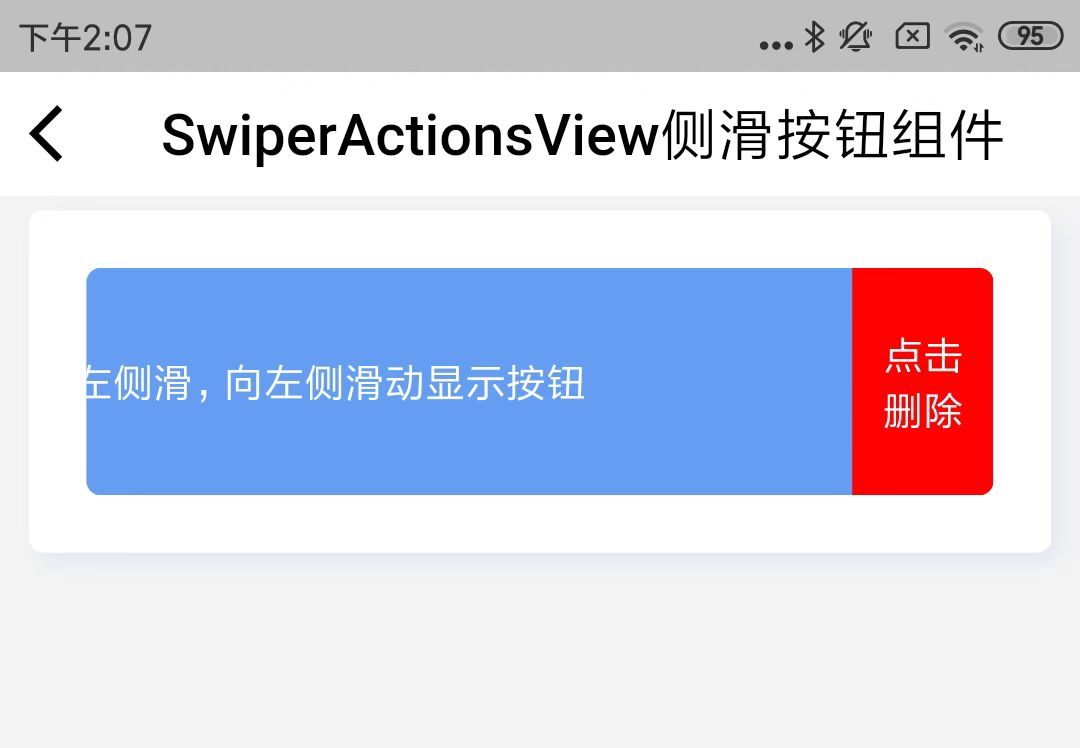
上述例子的效果图:
©深圳市酷开网络科技股份有限公司 ICP备案号粤ICP备06098778号